
이 페이지는 아직 번역되지 않아 영어 버전을 보고 계십니다.
Billing
Choose a plan, start the free trial, manage your card and invoices, and handle a failed payment.
You manage your ChatBeds plan in Settings → Plan and billing. Only people whose role includes Manage billing can open it. With the built-in roles, that is the Owner and Admin. Their login must also be able to use every hotel.
ChatBeds is priced per room, in your country's money. There is no setup fee and no commission on your bookings.
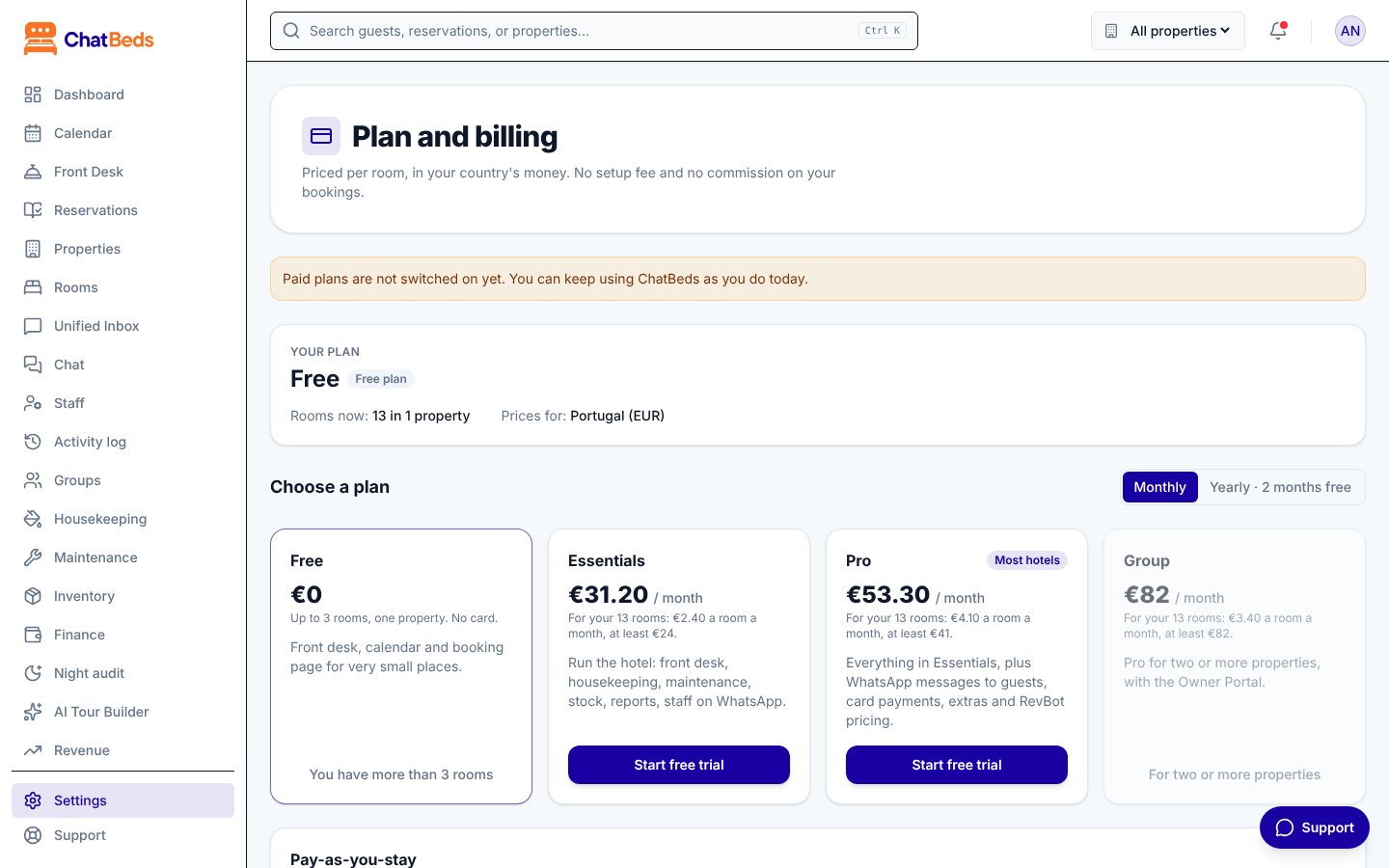
The plans
| Plan | Best for | What you get |
|---|---|---|
| Free | Very small places, up to 3 rooms | Front desk, calendar and booking page. One property, one person on WhatsApp. |
| Essentials | Running the hotel | Everything in Free, plus housekeeping, maintenance, stock, reports, analytics and the night audit. Up to 10 people on WhatsApp. |
| Pro | Most hotels | Everything in Essentials, plus WhatsApp messages to guests, card payments, extras, RevBot pricing, the partner API and AI tools. No limit on WhatsApp staff. |
| Pay-as-you-stay | New and seasonal properties | Pro's features, paid per room night you sell. One property, monthly only. |
| Group | Two or more properties | Everything in Pro for all your properties, plus the Owner Portal. |
When your plan does not include a feature, its page shows a short note and a See plans button instead.
How prices work
- You pay per room, per month, with a minimum monthly bill.
- Bigger hotels pay less per room: rooms 51 to 150 are 15% off, and rooms above 150 are 25% off.
- Yearly billing costs 10 months: two months free.
- Prices depend on the country in your property's address, and are shown in your local currency.
- Your price is locked for 12 months from when you subscribe.
For a hotel in the United States, prices before tax are:
| Plan | Per room per month | Minimum per month |
|---|---|---|
| Essentials | $3.50 | $35 |
| Pro | $6.00 | $59 |
| Group | $5.00 | $118 |
| Pay-as-you-stay | $0.40 per room night sold | $35 |
Example: Pearl Hotel has 20 rooms on Pro. The first 10 rooms are covered by the $59 minimum, and the other 10 cost $6 each. The bill is $59 + $60 = $119 a month.
Your exact prices are on the Plan and billing page and at chatbeds.app/pricing.
Ana, your voice assistant
Ana is included in every plan.
- Free plan: Ana for all of your set-up, then 15 minutes of help a month.
- Paid plans: up to 120 minutes a day for the whole account.
See Settings for Ana.
Ana at reception (add-on)
Ana at reception, the guest kiosk at your desk, is an add-on to your ChatBeds plan, chosen for each property in Settings → Reception.
| What you get | |
|---|---|
| Free try | 20 minutes with Ana, once per property, and 1 device |
| Reception | Included minutes each month, 1 device. Guests can ask questions, make requests, check in and check out |
| Reception Plus | More minutes each month, up to 3 devices, and walk-in bookings |
- Prices and included minutes depend on your country, like the plans. Settings → Reception shows yours in your currency, with the price of an extra minute and an extra device.
- The add-on is added to your ChatBeds subscription and paid on the same invoice. Choosing it needs a ChatBeds plan first, and a role that can manage billing.
- Minutes over the allowance are added to your bill.
- To stop it, press Remove the reception plan in Settings → Reception.
See Ana at reception.
WhatsApp message costs
Your hotel sends WhatsApp messages from its own number, on its own Meta account. Meta bills you directly for those messages. ChatBeds adds nothing on top. See Plans and trial.
Start your free trial
Every paid plan starts with a 14-day free trial. Until you choose a plan, your account works on Free.
Open Plan and billing
Go to Settings → Plan and billing.
Pick monthly or yearly
Choose Monthly or Yearly · 2 months free.
Start the trial
Click Start free trial on the plan you want.
Add your card on Stripe
You go to a secure Stripe page. Enter your card and billing address. You can also enter your VAT or tax number here. When you are done, you come back to ChatBeds.
- Nothing is charged until the trial ends.
- Stripe emails you a reminder before the trial ends.
- If you cancel before then, you pay nothing.
- The Plan and billing page shows Trial ends and First charge dates.
- There is one free trial per account, and one per card.
Your card and invoices
Click Manage card and invoices. A secure Stripe page opens where you can:
- Update your card
- See and download your invoices
- Change your billing address and tax number
- Cancel your plan
Cards are handled by Stripe. ChatBeds never sees your card number. Questions about a bill? Email billing@chatbeds.app.
Change your plan
- Go to Settings → Plan and billing.
- Choose monthly or yearly, then click Switch to on the plan you want.
- Confirm.
The difference for the rest of the billing period is added to, or taken off, your next invoice.
Rooms are counted for you. When you add or remove rooms, ChatBeds updates your bill within the hour. The difference is worked out the same way, on your next invoice.
Seasonal Pause
If your property closes for part of the year, you can pause instead of cancelling.
- For monthly paid plans, after the trial. Not for yearly plans or Pay-as-you-stay.
- From 1 to 4 months in a calendar year, starting at your next billing date.
- You pay 20% of your plan during the pause.
- Your booking page keeps taking bookings for next season. Staff tools, reports, guest messages and RevBot rest. Nothing is deleted.
Choose the number of months and click Plan the pause. Click End the pause now to come back early, or Cancel the pause if it has not started yet.
Cancel
Click Manage card and invoices, then cancel on the Stripe page. Your plan runs until the end of the period you paid for (or, during the free trial, until the trial ends), then your account goes back to Free. Nothing more is charged and your data is kept.
When you come back from Stripe, Plan and billing shows it straight away:
- A box at the top says Your subscription is cancelled, with the day your plan stops.
- The plan's badge says Cancelled, and Plan ends shows the same day.
- During a cancelled free trial, the banner at the top of every page says the trial is cancelled and nothing will be charged.
Changed your mind before that day? Click Manage card and invoices and renew the plan on the Stripe page.
After the plan has ended, the box says which plan was cancelled and when, and the account is on Free. Choose a plan under Choose a plan to start again (there is no second free trial).
If a payment fails
You have 3 days
After a failed payment, everything keeps working for 3 days. A red banner tells you, and Stripe emails you.
- Click Manage card and invoices and update your card.
- The payment is tried again straight away.
- As soon as it goes through, everything comes back.
If the bill is still unpaid after 3 days, your account works like Free until it is paid:
- Bookings, check-in and check-out, cash payments and all your records keep working.
- Paid features pause, and you cannot add rooms or properties.
- Nothing is ever deleted.
Some banks block online or international card payments until you turn them on in your banking app. If your card is declined, check that first.
Pay ChatBeds in cash or by bank transfer
If you can't pay by card, ChatBeds can take payment in cash, by bank transfer or by cheque. Contact ChatBeds support with the plan and how many months you want to pay for.
- Once the payment is received, ChatBeds turns your plan on. You get an email receipt with its number, and the payment is listed on Settings → Plan and billing under Payments made to ChatBeds directly.
- Plan and billing shows Paid until with the date. A week before it, you get an email reminder.
- To carry on, pay the next period the same way: it starts the day the last one ends. Or choose a plan by card on the same page: your card is first charged on the day the paid period ends, never for days already paid.
- If you don't pay again, your account goes back to Free on that date. Nothing is deleted.
Tax
Prices are shown before tax. Where VAT or sales tax applies, it is added at checkout. If your business has a VAT or tax number, enter it on the Stripe page so it appears on your invoices.
Discounts
- Founding 100: the first 100 properties in each country get 40% off for as long as they stay. The Plan and billing page shows if places are left.
- Refer a hotel: share the link on your Plan and billing page. When a hotel that signed up with it pays its first bill, you both get a month free.
- Hotel associations: if your association gave you a code, enter it on the Stripe page.
아직 도움이 필요하신가요?