
Night audit
Close each business day, fix what is left over, and get the day's figures on WhatsApp.
The night audit closes each of your hotel's days once the day is over. It saves the day's figures exactly as they stood, and lists anything your team still needs to sort out. You can let it run by itself each morning, or close the day by hand.
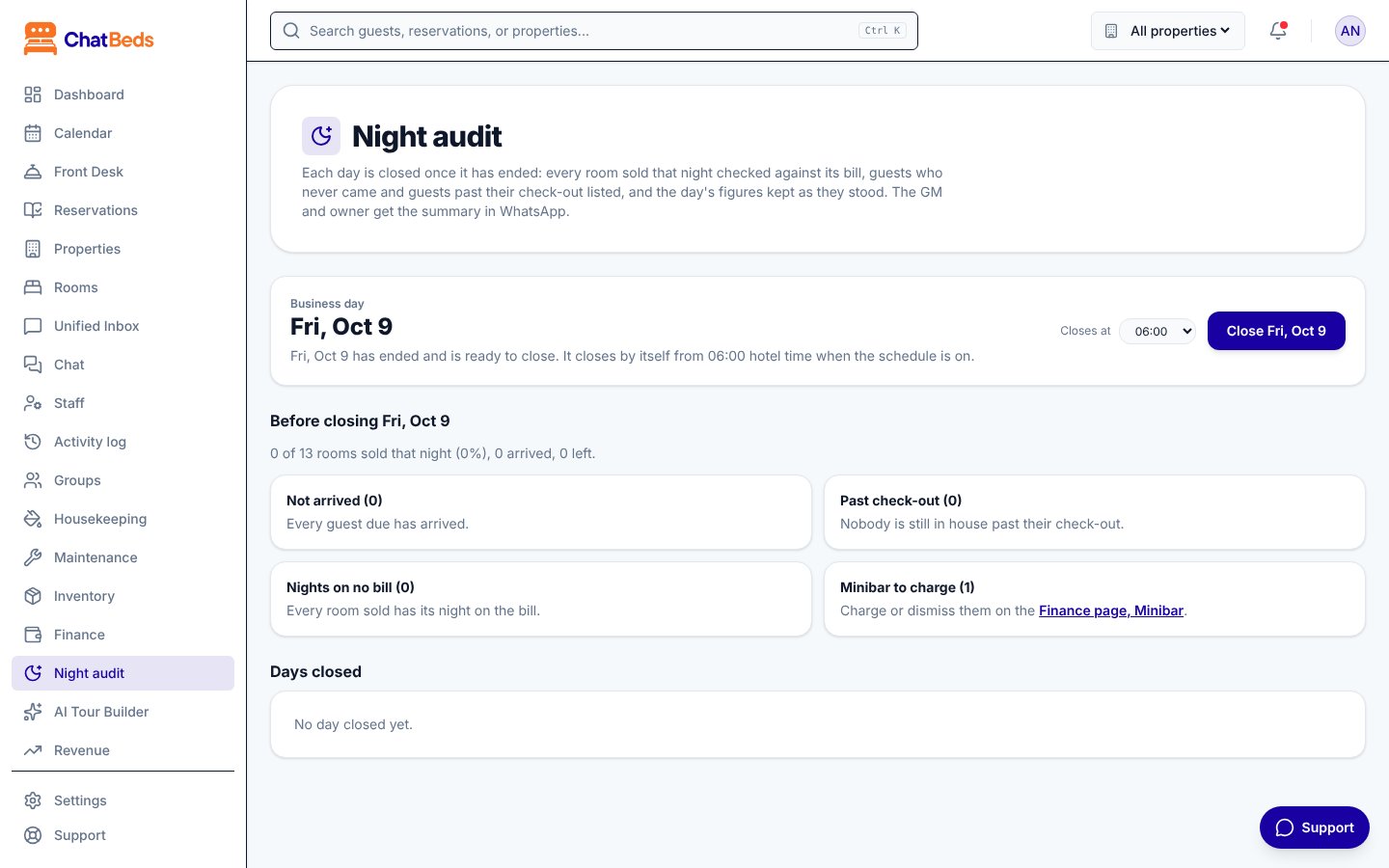
What the audit page shows
Go to Night audit on the dashboard. You see:
- Business day: the first day not yet closed.
- What needs acting on before you close (see below).
- Days closed: a table of past days with Rooms sold, ADR, RevPAR, Revenue, Money in, Expenses, Profit and Left to do.
Before you close: what to act on
| Section | What it means | What to do |
|---|---|---|
| Not arrived | Guests due who never came | Click Mark as no-show (the cancellation policy's fee, if any, is charged), or change their dates |
| Past check-out | Guests still in house after their check-out date | Extend the stay or check them out |
| Nights on no bill | A room was sold that night with no room charge (usually a guest kept past check-out) | Extend the stay (that posts the night) or check out |
| Minibar | Minibar items waiting to be charged | Charge or dismiss them on Finance → Minibar |
No-shows are your decision
The audit never marks a guest as a no-show by itself, because a no-show can carry a fee. Until you mark them, their nights still count in revenue. The summary tells you how much.
Close the day
On the Night audit page, click Close (for example, Close Fri 9 Oct). If more than one day is waiting, the button closes them all.
Each day is closed only once.
Closing by schedule
By default, ChatBeds closes the day by itself at the audit hour: 06:00 hotel time. An owner or admin can change the Audit hour on the Night audit page.
If days were missed, they are closed oldest first, up to 7 days back.
The summary on WhatsApp
After each close, the owner and GM get the summary on WhatsApp:
What the audit saves
When you close a day, ChatBeds keeps:
- rooms sold out of rooms you could sell (rooms out of order are left out), and occupancy;
- ADR: room revenue divided by rooms sold;
- RevPAR: room revenue divided by rooms you could sell;
- revenue by kind, tax, money in, expenses and profit;
- what guests owe, and the to-do counts.
The Finance page stays live
The audit keeps what the day looked like when it was closed. The Finance page keeps updating, so a charge posted later for a closed day still shows there.
Who can do what
| Owner, admin | Front desk | |
|---|---|---|
| Open the audit page, close the day, mark a no-show | Yes | Yes |
| See the money figures, change the audit hour | Yes | No |
In WhatsApp, night audit works for the owner, GM, front desk manager and night auditor.
Still need help?