
Security
How ChatBeds keeps your hotel's data safe, and how you control who can see it.
Your hotel trusts ChatBeds with its bookings, guests and money. Here is how that data is protected, and what you control yourself.
Signing in
People sign in at app.chatbeds.app in one of three ways:
- Email and password (at least 8 characters)
- Email me a sign-in link, which sends a one-time link to their inbox
A new account must confirm its email address before it can do anything. Invitation links and Google count as confirmed. If someone forgets their password, they click Forgot password? on the sign-in page.
Only the person who owns an email address can accept an invitation sent to it. A stranger cannot take an invited place by signing up with the same address.
Roles and access
- Every login has a role, and ChatBeds checks it on every action, not just on what the screen shows.
- Each login can be limited to some of your properties. It then sees nothing of the others.
- The same rules apply on WhatsApp. A staff member can only send the commands their role allows, and only to their own hotel's number.
- When someone leaves, turn their login off in Settings → Team and permissions. They are refused at once.
Details are in Roles and permissions.
Who can talk to your WhatsApp number
- A message only runs a command if it comes from a staff phone that has been linked to your hotel.
- Each link code works once, for 24 hours, and only at your hotel. After five wrong codes in an hour, a number is blocked for the rest of the hour.
- Messages from anyone else, such as guests, never run commands. They go to the Unified Inbox for a person to answer.
Support access
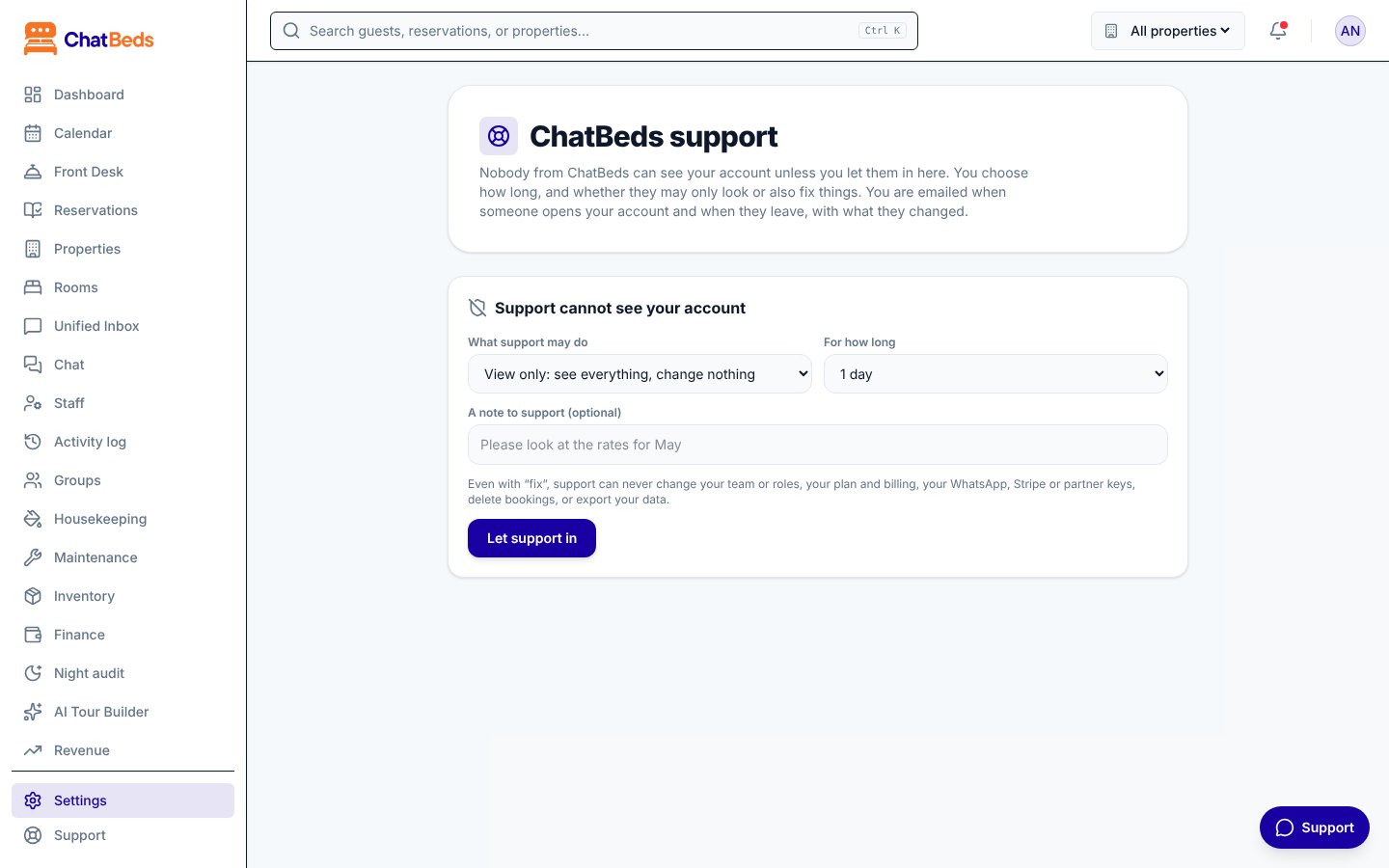
Nobody from ChatBeds can see your account unless you let them in. You decide how long, and whether they may only look or also fix things.
You manage this in Settings → ChatBeds support. Your role needs Manage the team (the Owner and Admin roles have it).
Choose what support may do
Under What support may do, pick View only: see everything, change nothing, or View and fix: may change bookings, rooms, rates.
Choose for how long
Under For how long, pick 1 hour, 1 day, 7 days or 14 days.
Add a note and let them in
Optionally add a note, such as "Please look at the rates for May". Then click Let support in.
Access ends by itself when the time is up. To end it sooner, click Turn off now.
When support asks first. If our team needs to look at something, they send a request. It appears at the top of Settings → ChatBeds support with the reason. Click Approve or Decline. A request you don't answer ends by itself.
What support can never do, even with "View and fix":
- Change your team or roles
- Change your plan and billing
- Change your WhatsApp, Stripe or partner keys
- Delete bookings
- Export your data
You always know. You get an email when someone from support opens your account and when they leave, with what they changed. Every visit is listed under Visits by ChatBeds support: who, when, why, and each change they made. Support staff cannot change support access themselves. Only your hotel can.
ChatBeds will never ask for your password. If we need to look inside your account, we ask your owner or admin to turn on support access.
Encryption and storage
- All traffic to ChatBeds uses HTTPS.
- Secrets you give ChatBeds, such as your WhatsApp access token and channel calendar links, are encrypted again before they are stored. Once saved, the WhatsApp token is never shown again.
- Partner API keys are shown once. Only a scrambled version is kept, and you can revoke a key at any time.
- Card numbers for your ChatBeds plan are handled by Stripe and never reach ChatBeds.
- ChatBeds runs on Google Cloud, with Firebase for sign-in. Databases are backed up.
A record of who did what
- The Activity log shows who did what at your hotel, when, and whether from WhatsApp or the dashboard.
- The Activity tab in Settings → Team and permissions records every change to the team and roles.
- Support visits are listed in Settings → ChatBeds support.
Report a security problem
Found something that looks wrong? Email contact@chatbeds.app with "Security" in the subject. We read every report. Please give us time to fix the problem before telling anyone else.
More details are on our security page.
Still need help?