
Activity log
See who did what at your hotel, when, and whether they did it from WhatsApp or the dashboard.
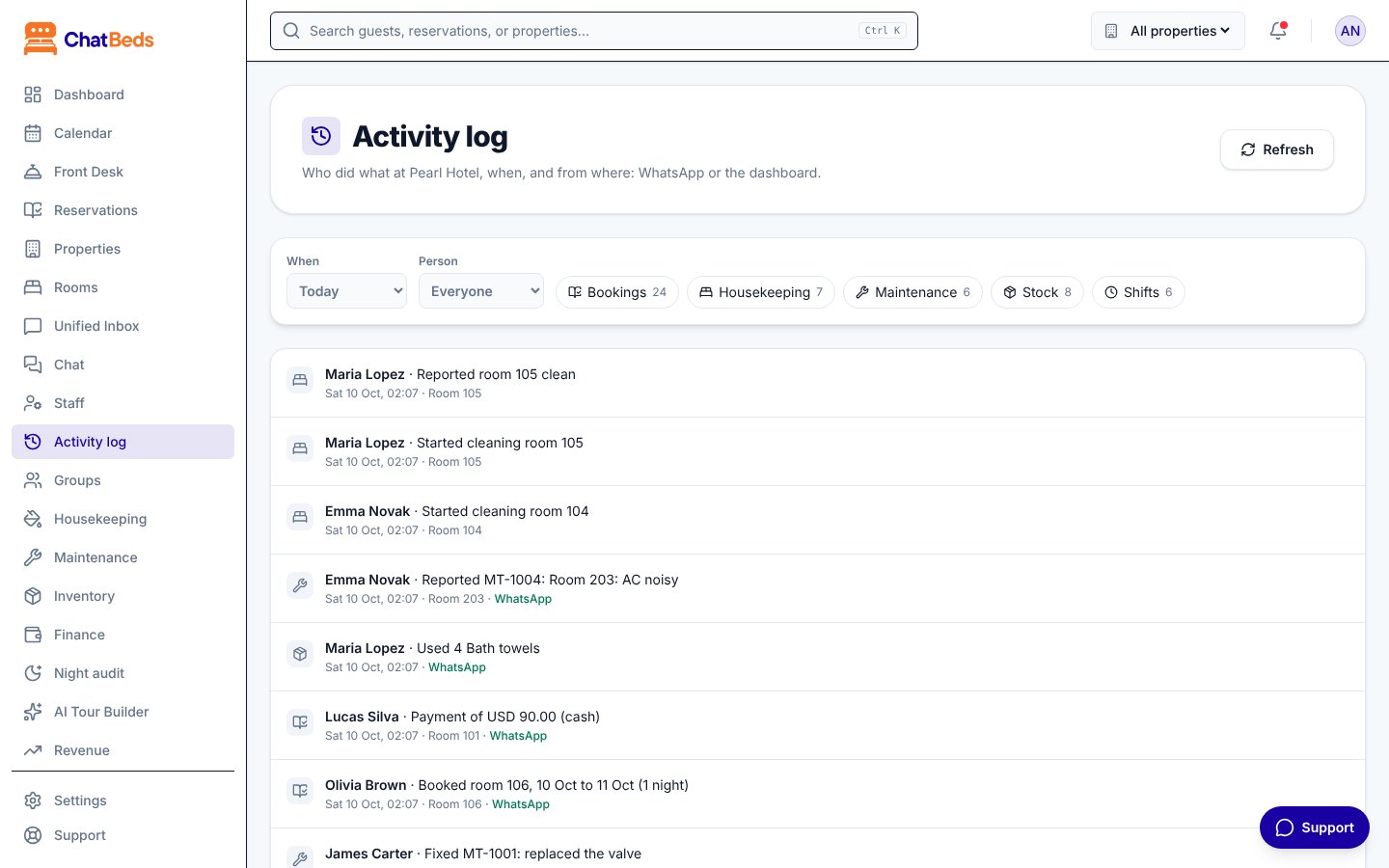
The Activity log is one timeline of everything your team did at a property. Each line tells you:
- Who did it
- What they did, for example "Reported room 204 clean" or "Took MT-1047"
- When, in your hotel's own time
- Which room, when there is one
- From where: WhatsApp, Dashboard, or Automatic when ChatBeds did it by itself
Open it from Activity log in the sidebar.
What it covers
| Kind | What is recorded |
|---|---|
| Bookings | Bookings made, rooms assigned, moves, check-ins and check-outs, payments, cancellations |
| Housekeeping | Cleaning started, rooms reported clean, cleaning closed or cancelled, rooms passed or failed at inspection |
| Maintenance | Problems reported, tickets taken, tickets fixed or cancelled |
| Stock | Items used, written off, restocked, counted and received; supply requests and deliveries |
| Shifts | Clock in and clock out, including when a manager did it for someone, and shifts closed automatically |
Click a line to open the page with the full details, such as the booking or the maintenance ticket.
Filter the log
Use the filters at the top of the page:
- When: Today, Yesterday, Last 7 days or Last 30 days.
- Person: Everyone, or one name from the list.
- Kind: click Bookings, Housekeeping, Maintenance, Stock or Shifts to show only those. Each button shows how many entries it has. Click again to turn it off.
Click Refresh to load the newest entries.
Long lists
If there are a lot of entries, the page shows the latest ones and tells you how many there are in total. Choose a shorter period or one person to see the rest.
Examples
"Who checked in room 105 last night?" Choose Yesterday, turn on Bookings, and look for room 105.
"How did Anna's shift go?" Choose Today, pick Anna under Person. You see when she clocked in, which rooms she cleaned, and what she asked for.
"Is the team using WhatsApp?" Look at the WhatsApp and Dashboard labels on each line.
Good to know
- The log shows one property at a time. If you have several, pick one with the property switcher at the top.
- Names stay right after people leave. If you remove Lucas from the staff list, his past work still shows as Lucas.
- The log reads from the records ChatBeds already keeps. Nothing extra needs to be switched on.
Who can see it
The Activity log is for people whose role includes See reports or Manage the team. With the built-in roles, that is the Owner, Admin (GM) and Accountant. You can give it to a custom role too.
Other records
- Changes to the team and roles (who invited whom, who changed a role) are on the Activity tab of Settings → Team and permissions.
- Visits by ChatBeds support are listed on Settings → ChatBeds support. See Security.
- Rate changes are in the rate history. See Rates and RevBot.
Still need help?