
The housekeeping board
Follow every room from dirty to cleaning, inspection and ready on one live board.
Open Housekeeping in the menu. The board shows every room that needs work, in four columns. It updates by itself when anything happens in WhatsApp, on the tape chart or at the front desk, so you never need to refresh.
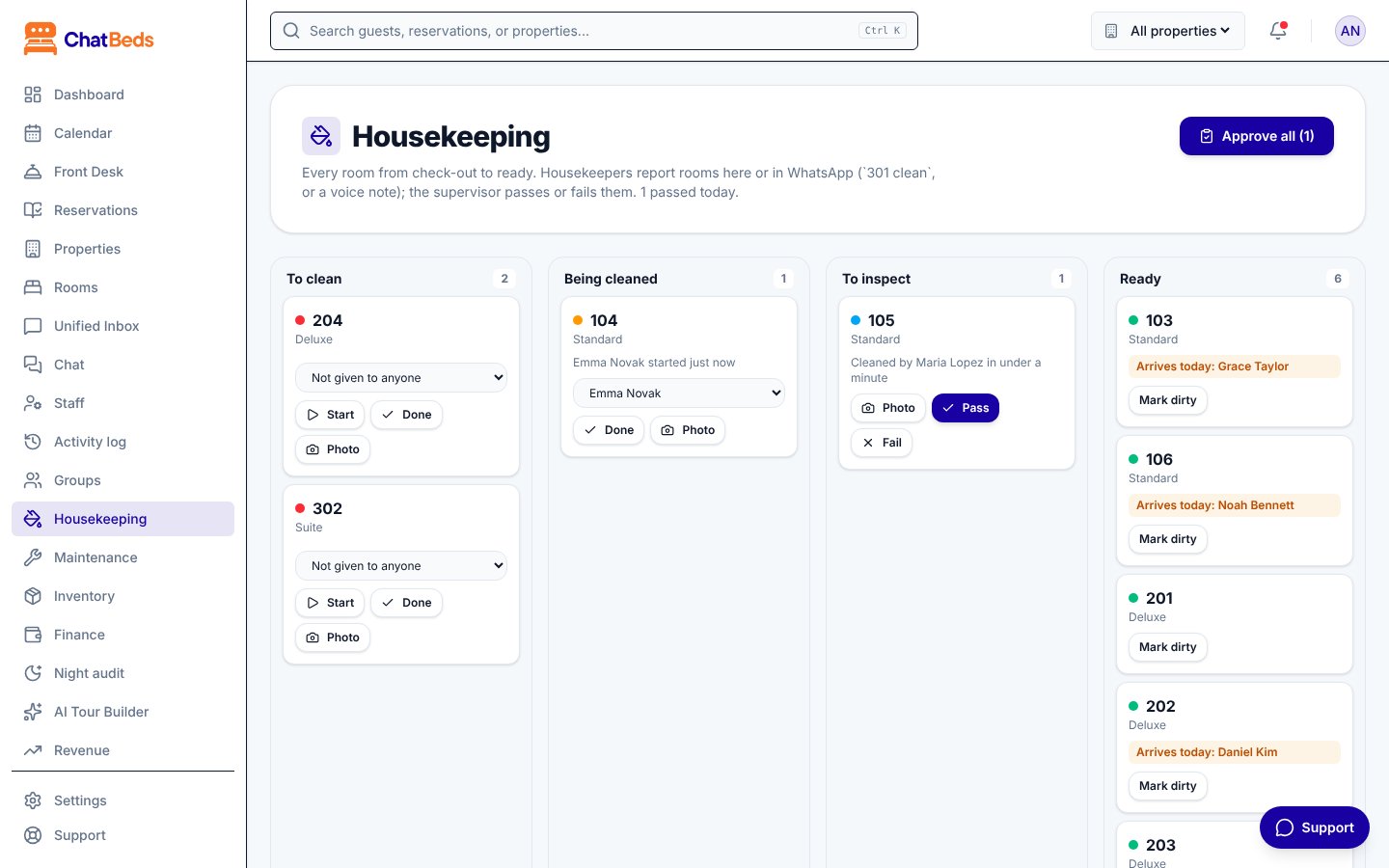
The four columns
| Column | Room status | What it means |
|---|---|---|
| To clean | Dirty | Needs cleaning: a check-out, a guest moved out, or someone marked it dirty |
| Being cleaned | Being cleaned | A housekeeper has started |
| To inspect | To inspect | Reported clean, waiting for a supervisor |
| Ready | Clean or ready | Ready for the next guest |
Under the columns, Other rooms lists rooms that are occupied, on do not disturb or under maintenance. At the bottom you'll find Supply requests.
What a card shows
Each room card can show:
- the room type and floor;
- Check-out, if the room was just vacated;
- a guest arriving today, so you clean that room first;
- Failed and the reason, if a supervisor sent it back;
- who is cleaning it and how long ago they started;
- who it is given to, or "Not given to anyone yet";
- minibar items reported;
- photos and the photo check score.
Working on the board
Start
On a room in To clean, click Start. The room moves to Being cleaned and the clock starts.
Done
When it's clean, click Done. The room moves to To inspect and the supervisor is told.
Inspect
A supervisor clicks Pass (the room is ready) or Fail and says what needs doing again. See Inspections and photo checks.
Other buttons:
- Photo adds a room photo to a room that is to clean, being cleaned or waiting for inspection.
- Mark dirty sends a ready room back to To clean.
- Needs cleaning (under Other rooms) is for a guest in house who asks for service.
- Approve all passes every room waiting for inspection at once.
The buttons switch off while an action is running. If two people act on a room at the same moment, the note tells you what actually happened, such as "was already waiting for inspection".
Rooms with a guest still in them
A stay-over (a room cleaned while the guest is still staying) skips inspection. When it's reported clean, it goes straight back to occupied.
Rules worth knowing
- Do not disturb stops a clean in progress. The room goes back on the list and the clock restarts at the next start.
- A room under maintenance can't be started, reported clean or dirty. It comes back when its maintenance ticket is fixed, or on the Rooms page. See Working tickets.
- A guest checking in cancels any cleaning task for that room.
- Marking a room clean or ready by hand (on the tape chart or Rooms page) closes its task.
Doing the same from WhatsApp
Use Start, Done, Pass, Fail and Approve all on the board.
Who can do what
| Task | Who |
|---|---|
| See the board | Anyone signed in |
| Start, finish, mark dirty, add photos, ask for supplies | Roles that can clean rooms, such as Housekeeping |
| Pass, fail, Approve all, give rooms to people | Roles that can inspect rooms: Owner, Admin or Housekeeping |
Still need help?