
Staff and shifts
Keep your WhatsApp staff list, track shifts, and see who is on duty and how many hours they worked.
The Staff page lists the people who run your hotel from WhatsApp. It also shows who is on duty now, their hours this week, and a time sheet.
Staff list or dashboard login?
The Staff page is for WhatsApp. People who sign in to the dashboard are under Settings → Team and permissions. A person can be on both. See Roles and permissions.
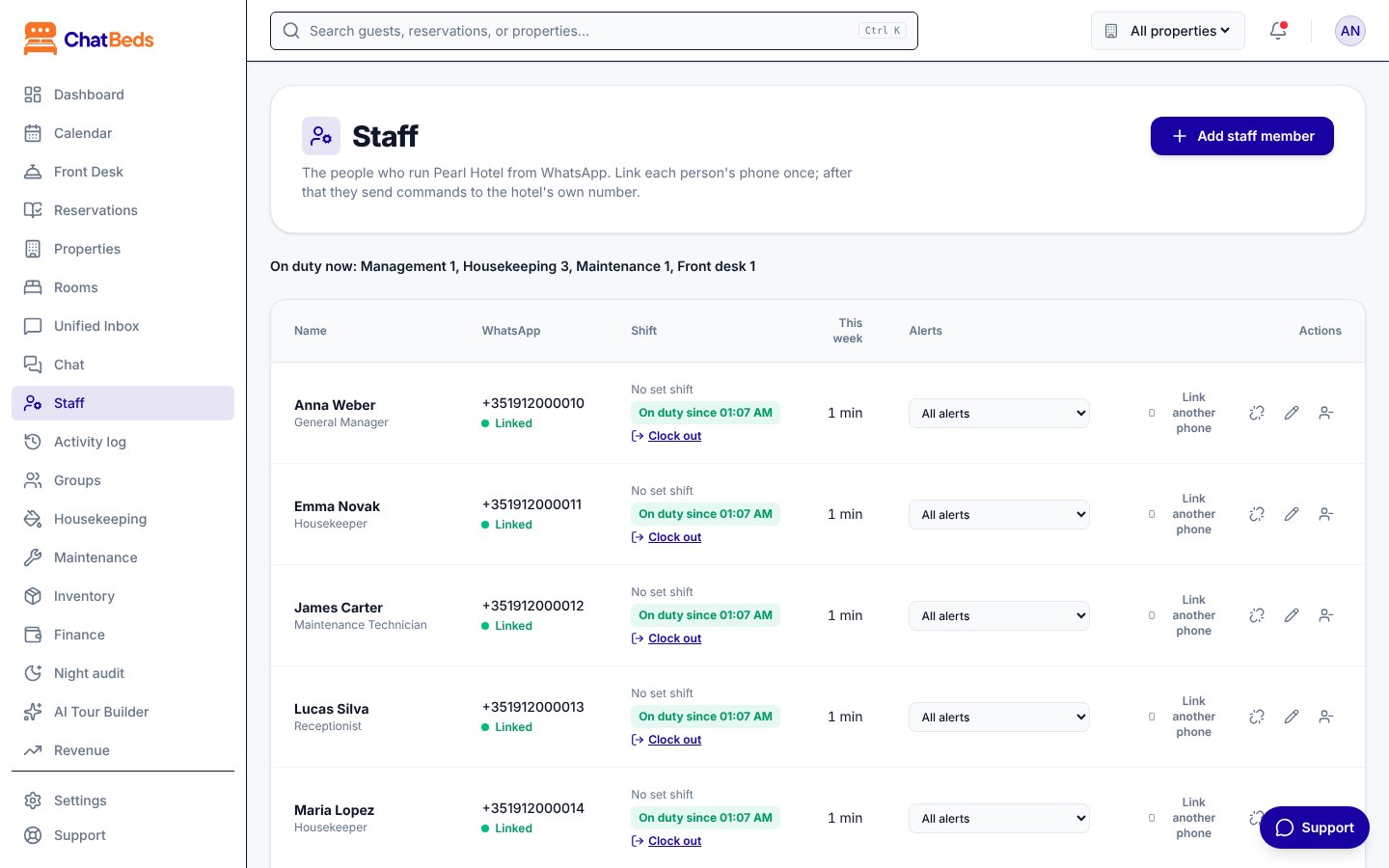
Add someone to the staff list
- Open Staff in the sidebar and click Add staff member.
- Fill in the details:
- Name
- Role: decides which chat commands they can use and which alerts they get.
- Shift: Morning, Evening, Night, or No set shift.
- Department: leave it on From the role unless you need something else.
- Floor (optional): housekeeping alerts and room lists use it.
- Alerts: All alerts, Important and critical only, Critical only or No alerts.
- WhatsApp number (optional), with the country code.
- Click Add staff member, then Link WhatsApp on their row so they can connect their phone.
Linking a phone is explained step by step in Add your team.
Your plan sets how many people can be on WhatsApp: 1 on Free, 10 on Essentials, and no limit on Pro and Group. See Billing.
Shifts
Set your hotel's shift times in the Shift times box on the Staff page, then click Save shift times. If you don't set them, ChatBeds uses:
| Shift | Times (hotel's local time) |
|---|---|
| Morning | 07:00 to 15:00 |
| Evening | 15:00 to 23:00 |
| Night | 23:00 to 07:00 |
A shift does not put anyone on duty
Being down for a shift only tells ChatBeds when someone is expected. A person is on duty only after they clock in. Alerts go to people who are on duty.
Clock in and out
Staff send clock in when they start and clock out when they leave.
They can also send my hours to see their hours on duty this week.
Late arrivals
Someone who clocks in more than 10 minutes after their shift began is marked late, with how late. It shows on the Staff page, in who is on duty, and in their own reply:
Forgot to clock out
16 hours after clocking in, a person stops counting as on duty, so alerts stop going to them. The Staff page shows Never clocked out.
Their shift is closed at the 16-hour mark when they next clock in or out, or when a manager clicks Close shift on their row. ChatBeds tells the person, and asks them to tell their manager if that is wrong.
Who is on duty
- On the dashboard, the On duty now line at the top of the Staff page lists everyone clocked in.
- On WhatsApp, owners, GMs and supervisors can send
who is on duty.
The time sheet
The Time sheet on the Staff page adds up each person's hours, day by day, one week at a time.
- Use Previous week and Next week to move between weeks.
- It shows each person's total, and how many shifts had no clock-out.
- A shift that runs past midnight is split between the two days.
- The This week column on the staff list shows hours since Monday.
Shifts cannot be edited yet. A wrong one shows on the time sheet as a shift with no clock-out.
The time sheet is a record of hours. ChatBeds does not plan rotas ahead, track leave, or work out pay.
Remove someone
When a person leaves, click Remove on their row.
- If they are on duty, their shift ends.
- Their WhatsApp number is unlinked and freed, so it can be linked to someone else.
- Their name stays on everything they did, such as "cleaned by" or "fixed by". Your records stay complete.
To keep the person but stop their phone working, click Unlink WhatsApp instead. That also ends their shift if they are on duty.
Who can manage staff
Anyone whose role includes the Staff page can see the list and the time sheet. Adding, changing and removing staff, clocking people in or out, and setting shift times need the Manage staff permission. The Owner and Admin roles have it.
Learn how alerts follow shifts in Alerts and shifts.
Still need help?