
Alerts and shifts
Who gets which WhatsApp alert, how alert levels and quiet hours work, and why clocking in matters.
Alerts are messages ChatBeds sends to your team when something happens: a room to clean, a new ticket, a new booking. Each alert goes only to the people it concerns, and only while they are at work.
Who gets which alert
| When this happens | Who is told |
|---|---|
| New booking, walk-in, cancellation or no-show | Owner, GM, front desk manager |
| A guest checks out, or moves room (the old room needs cleaning) | Housekeepers on duty, on that floor if floors are set |
| A room is marked dirty | Housekeepers on duty |
| A room is reported clean | Housekeeping supervisor on duty |
| A room passes inspection | The housekeeper who cleaned it |
| A room fails inspection | The housekeeper who cleaned it, with the reason |
| A room is given to a housekeeper | That housekeeper |
| Supplies are asked for | Housekeeping supervisor on duty |
| A maintenance ticket is opened | Maintenance team on duty, and the GM |
| A ticket is given to someone | That person |
| A ticket is fixed | The GM, and whoever reported it |
| A room is put out of order | GM, front desk manager |
| A guest pays a card payment link | Whoever sent the link, the front desk manager and the GM |
| Minibar items that could not be charged by themselves | The front desk on duty |
| Stock runs low or out | The supervisor for that kind of stock, and the GM |
| RevBot has new price suggestions, or the autopilot changed prices | Owner, GM |
| The night audit closes a day | Owner, GM: the day's summary |
The person who did something is not alerted about their own action. When an action was done from WhatsApp, the alert says who did it, for example "(by Maria, in chat)".
Daily briefings
ChatBeds also sends briefings at set times, in your hotel's local time:
- 07:00 operations briefing: owner, GM and heads of department (housekeeping supervisor, front desk manager, maintenance lead).
- 08:00 morning briefing and 20:00 evening briefing: owner and GM only, because they include money.
Being on duty
Alerts follow shifts. Staff get alerts only while they are clocked in. This keeps phones quiet on days off and at night.
Being on the rota is not enough. A person is on duty only when they clock in:
- From WhatsApp: they send
clock inwhen they start andclock outwhen they leave. - From the dashboard: a manager presses Clock in or Clock out on the person's row on the Staff page, for someone who forgot or has no phone.
A person who clocks in more than 10 minutes after their shift began is shown as late.
Forgot to clock out?
16 hours after clocking in, a person is no longer treated as on duty, so alerts stop reaching them. Their shift is closed at 16 hours, and they are told the next time they clock in or out. A manager can also press Close shift on their row.
Shift times, the time sheet and who is on duty are explained in Staff and shifts.
Off shift
When staff are off shift, they get nothing. There is one exception: owners and general managers still get critical alerts, even off shift. For example, an urgent maintenance ticket or a booking clash with Booking.com.
When nobody is on duty
An alert is never lost silently.
- If nobody in the right role is on duty, ChatBeds tells the GM instead.
- If there is no GM, it tells the owner.
The same rule applies to them: off shift, they only get critical alerts.
Alert levels
Each person chooses how many alerts reach them. Set it in the Alerts column on the Staff page.
| Level | What reaches them |
|---|---|
| All alerts | Everything for their role |
| Important and critical only | Only alerts that matter most, such as new bookings, failed inspections and urgent tickets |
| Critical only | Only the most urgent alerts |
| No alerts | Nothing. They can still send commands |
Most alerts, like a room to clean, are routine. An urgent or high-priority maintenance ticket is critical.
Quiet hours
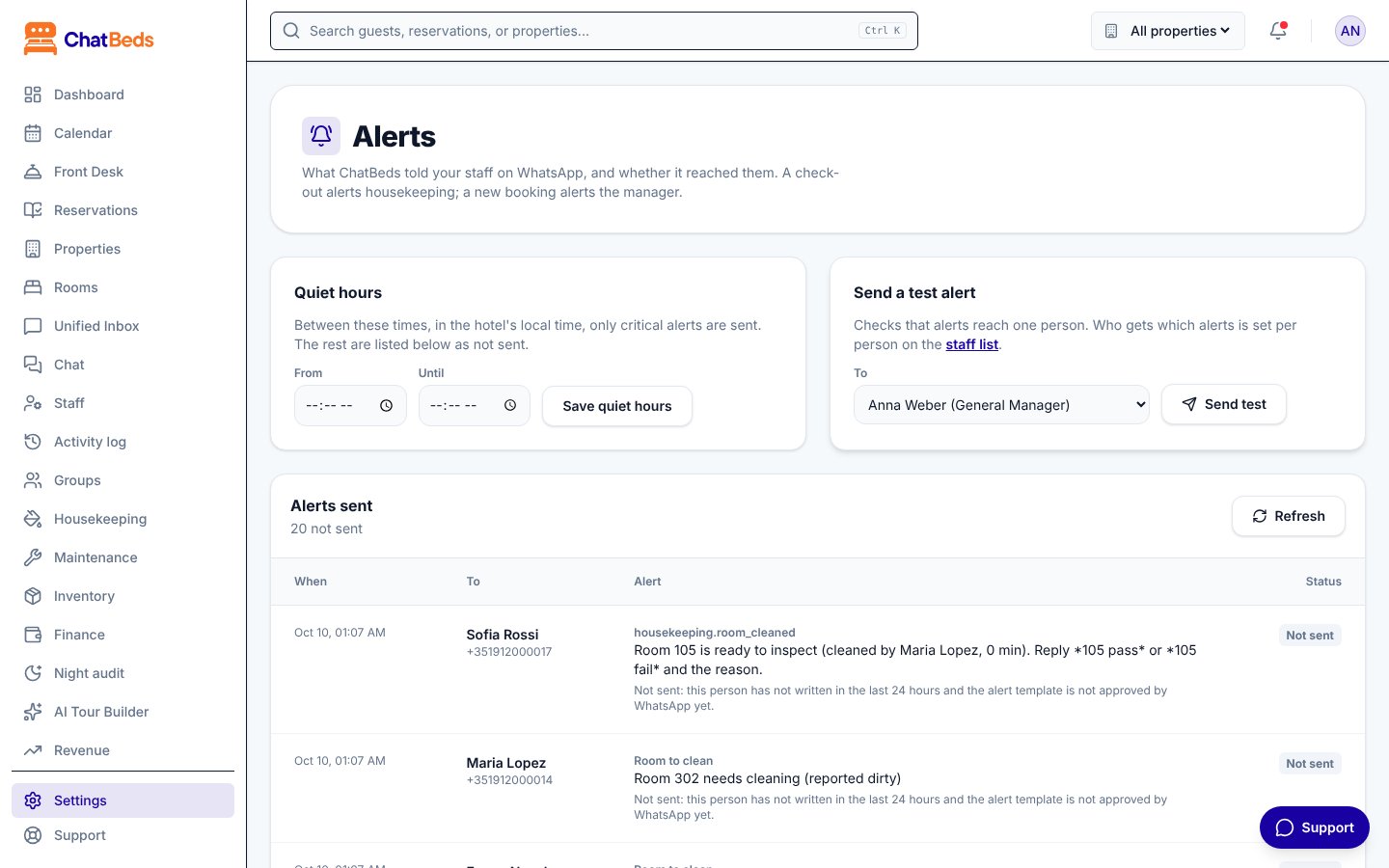
In Settings → Alerts, you can set Quiet hours: a time window, in your hotel's local time, when only critical alerts are sent. Other alerts are listed as not sent. Press Save quiet hours, or Turn off to switch them off.
The 24-hour window
WhatsApp lets a business send ordinary messages to a person only within 24 hours of that person's last message. After that, it must use a message template that WhatsApp has approved.
- If a staff member has written to the hotel's number in the last 24 hours, their alert arrives as a normal message.
- If not, ChatBeds sends it as the approved staff alert template.
- If that template is not approved yet, the alert is not sent, and the alerts log says why.
Tip: staff who send clock in each morning open the window for their whole shift.
Check what was sent
Settings → Alerts shows The alerts log: every alert, who it went to, and whether it was Sent, Delivered, Read, Not sent or Failed. Use Send a test alert to check that alerts reach one person's phone.
Only staff who have linked their phone receive alerts. See Add your team.
Still need help?